
 industry
Digital Business Cards for Contractors and Service Businesses
A digital business card for contractors lets you share your contact info via QR code on every estimate and job, capture the customer's details automatically, and follow up with context you'd otherwise lose. Unlike paper cards that get tossed, a digital card keeps every connection in a system you can actually work from.
Digital Business Cards for Contractors and Service Businesses
Service contractors know the score. You're out on job sites, you're meeting clients face-to-face, you're building relationships that should turn into repeat work. But you're doing it the old way: handing out paper cards that tell nobody what you actually do, waiting for that phone to ring.
Here's the problem with paper cards on a construction job or at a home improvement estimate: you give them out, then you're invisible. No context. No follow-up. No system. The client calls someone else because at least they remembered the name.
A digital business card changes that. You share your contact info via QR code at every estimate, every walkthrough, every consultation. The client enters their details. Now you have a lead you can actually track, a pipeline you can manage, and a reason to stay top-of-mind.
What Contractors and Service Businesses Need From a Digital Business Card
Service businesses are different from other professions. You're not sitting at a desk. You're in the field. Your card needs to work in that world.
1. Fast to share. You're standing in a customer's garage or kitchen. You pull out a QR code sign-in sheet or put it on your invoice. They scan it. Takes 5 seconds. Done.
2. Capture the job type. A plumber needs to know: did they call about a leak? A full bath remodel? A new construction? A digital card lets the customer tell you. Paper doesn't.
3. Build a database of leads, not a stack of notes. Every service business runs the same way: you finish a job, you hope they call you back for the next one. But you have no record of what you did, what they asked for, or whether you ever followed up. A digital card fixes that. You have their info. You have their job type. You have dates.
4. Link to your portfolio or past work. Contractors thrive on reputation. A paper card has a phone number. A digital card can link to before-and-after photos, customer reviews, or your website. That's a closer.
5. Schedule work directly. Add a booking link to your digital card. Customers can see your availability and schedule an estimate on the spot. No phone tag. No "I'll call you back." Just done.
Why Paper Cards Fail Service Contractors
I learned the importance of context the hard way running AdamHelper, a moving and labor service in Boston. Customers would text me weeks or months later asking "is that quote still good?" But I had no idea what I'd quoted them on. Moving a one-bedroom apartment? Three floors? Across town or cross-country? I'd have to call them back and ask.
Service contractors face the same problem at scale. You estimate 20 jobs a month. Half of them go cold. You have no record of what you offered, what the customer needs, or whether you've ever followed up. You're leaving money on the table because you're managing your pipeline in your head instead of a system.
A paper card doesn't capture anything. It's a one-way street. You give your info. The customer loses the card or doesn't use it. You get nothing back.
How Contractors Use Digital Business Cards on the Job
Here's what the workflow looks like:
At the estimate: Display your QR code on your invoice, on a sign you carry, or on a shirt pocket sticker. The customer scans it. They enter their name, phone, email, and what the job is about. You now have a record of the lead.
After the job: Every customer who scanned your card is in your system. You can tag them by job type, add notes about their project, and set reminders for when to follow up. Want to remind them that a new furnace system is available? They had a roof estimate with you 18 months ago? You have their contact info and context.
The follow-up: Instead of "Hey, do you remember me?" you can send "Hi Sarah, thanks again for choosing us to replace your kitchen. Our team just finished a similar project in your neighborhood. Want a walkthrough?" That's the difference between cold and warm.
Repeat business: Service businesses are built on repeat customers. A digital card system with context turns one-time customers into repeat clients. You call them when something fits their need. You're top-of-mind when they're ready to buy again.
Digital Business Cards vs. Paper for Contractors
Vs. paper: Paper tells your name and phone number. Digital captures the job type, builds your pipeline, lets you follow up with context. Paper gets lost. Digital lives in their phone.
Vs. phone-based leads: Some contractors use Google Local Services Ads or rely on customer referrals. Both work, but both leave you without control. A digital card puts lead capture in your hands. Scan at every estimate. Build your own database.
Vs. CRM alone: A CRM is where you manage leads once you have them. A digital business card is how you capture leads in the first place, at the moment of contact, before they're in your system.
Vs. NFC cards (Popl, Linq): NFC cards require special hardware and apps. They're cool but expensive and unreliable. QR code-based cards like MY MASH Card work on any phone with a camera. No app. No chip. No tap. Just scan.
What to Put on a Contractor's Digital Business Card
Your digital card should include:
- Your name and professional photo (you, on a job site if possible)
- Business name and logo
- Phone (clickable to call)
- Email (clickable to email)
- Your website or portfolio (photos of past work)
- Service areas or specialties ("Plumbing in Boston Metro" or "Kitchen Remodels")
- Booking link (Calendly or similar for estimates)
- Social links (Facebook, Instagram if you post before/afters)
- Testimonials or review links (Google Reviews, Yelp)
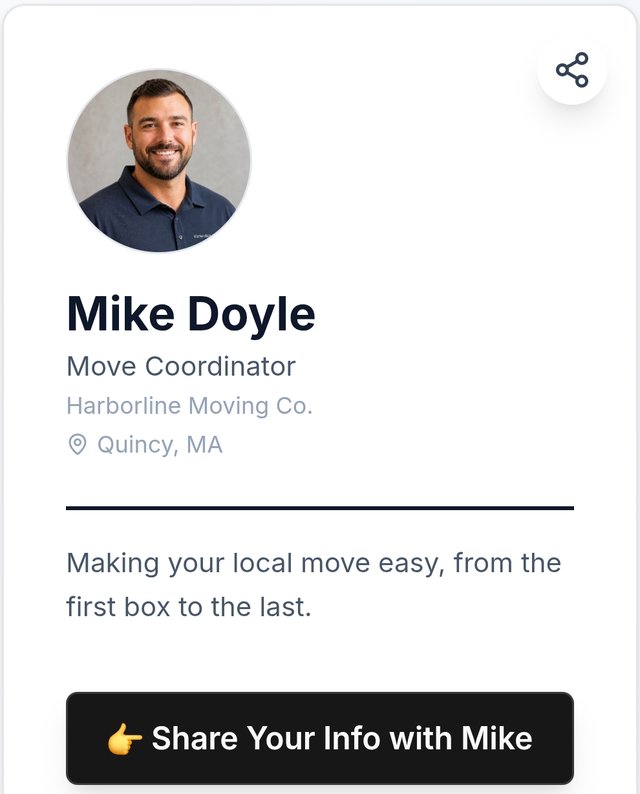
Keep it clean. The customer is scanning from a job site. Your card should load fast on a phone, even on spotty Wi-Fi.
The Follow-Up System: Where Most Contractors Leave Money on the Table
Here's the truth: capturing a lead is 20% of the work. Following up is 80%.
Service contractors who have the most consistent pipeline don't get lucky with referrals. They get predictable results because they have a system. They capture every lead. They follow up based on the job type and timing. They stay in touch without being pushy.
A digital business card that captures leads but doesn't help you follow up is only doing half the job. You need reminders. You need to track who you've called. You need to know when to re-engage.
That's why MY MASH Card includes follow-up features. When someone scans your card, you don't just get their contact info, you get reminders to call them. You can tag them by job type. You can track your outreach. It's a lead capture tool and a follow-up system in one.
The contractors I've worked with who close the most jobs aren't the ones with the most leads. They're the ones who follow up consistently.
How to Get Started
-
Create your digital card. Sign up at MY MASH Card. Add your photo, business name, services, phone, email, and booking link.
-
Generate your QR code. The system creates a unique QR code. Download it.
-
Print it everywhere. Business cards (yes, you can still use cards, just with a QR code), invoices, signage for your truck, a sign-in sheet at estimates, work site signage.
-
Capture at every interaction. Every estimate. Every consultation. Every job walkthrough. Scan = lead.
-
Follow up based on context. Use the tags, notes, and reminders to stay in touch. Re-engage when something fits their needs.
The Bottom Line
Service businesses are built on relationships. But relationships don't start with a paper card. They start with the first time you capture someone's information and actually use it.
A digital business card for contractors and service businesses isn't about looking tech-savvy. It's about capturing every estimate, keeping the context, and following up when it matters. That's how an estimate turns into a job, and a job turns into a loyal customer.
Ready to stop losing leads at estimates? Create your digital business card and start capturing every opportunity.
Want to learn more about following up after the first interaction? Check out our guides on how to follow up after networking and how to capture leads without losing them.
What should you do?
- Best for
- Contractors and service businesses who want a complete lead capture and follow-up system, not just a digital card
- Use this when
- Use a digital business card on every estimate, job, and customer interaction to share contact info and capture leads automatically
- Avoid if
- Cards that only share your info without capturing the customer's details back — you'll lose every lead
- Alternatives
- Popl and Linq offer NFC-based cards — hardware dependent, cost more, and don't work on all phones. HiHello and Blinq offer digital cards but focus on sharing, not lead capture + follow-up.
Stop letting connections go cold
My MASH Card captures who you meet, remembers the context, and helps you follow up before the opportunity disappears.


