
Digital Business Card CRM Sync: The Missing Link Before Your CRM
A CRM only knows about a lead once someone types it in. My MASH Card captures the person, the context, and the conversation the moment it happens, then pushes it straight into NinjaPipe, DealDrive, Google Sheets, or virtually any CRM you already run.
$15/month is less than the cost of losing one lead you'd have otherwise forgotten to follow up on.
Most SMBs and founders lose leads in the gap before a CRM even exists for them, at the handshake, the QR scan, the conversation nobody wrote down. My MASH Card sits in that gap: it captures the person and the context the moment you meet them, then syncs automatically into NinjaPipe, DealDrive, Google Sheets, or virtually any CRM via webhook, no manual re-entry, with a logged history of every sync attempt.
The problem
Capturing a lead is only half the job. The other half is getting it into whatever system actually runs your business, a CRM, a spreadsheet, a pipeline tool your team already lives in. That second step is usually manual: export a CSV, open a spreadsheet, copy and paste, hope nothing gets missed in the process.
Manual re-entry doesn't just cost time. It's where duplicate records, stale contact info, and dropped leads actually happen, not because anyone didn't care, but because there was a hand-off step with no system watching it.
How My MASH Card handles it
Connect NinjaPipe, DealDrive, Google Sheets, or a webhook once in Settings, and every new lead pushes outbound automatically on capture. Nothing to remember, nothing to re-type. If a sync fails for any reason, it's logged with the actual error and flagged for a one-click retry, not silently dropped.
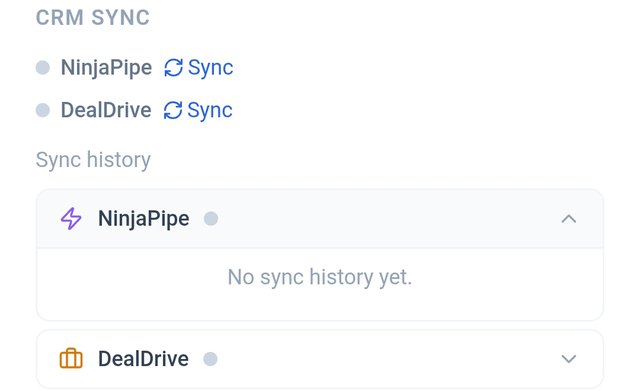
Before
No sync history yet — nothing pushed out.
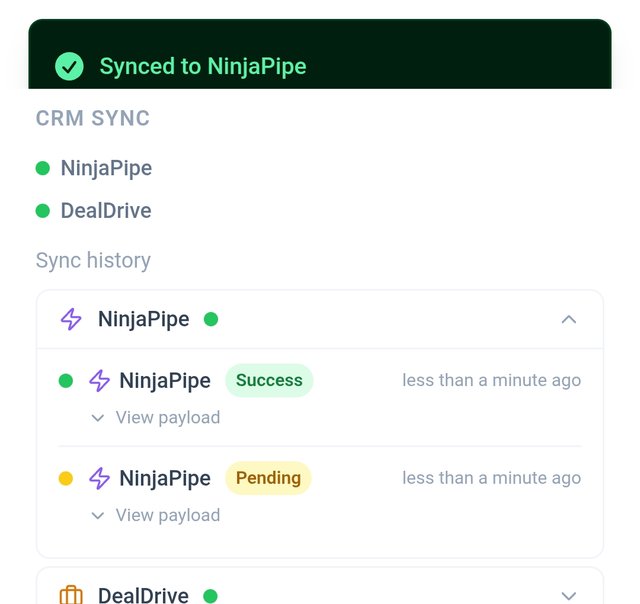
After
Synced automatically, with a logged history.
| Feature | What it does |
|---|---|
| Works with virtually any CRM | Outbound webhook support means HubSpot, Salesforce, Pipedrive, Zoho, or anything else that accepts a webhook, works today |
| Native NinjaPipe sync | New leads push directly to your NinjaPipe pipeline on capture, no webhook setup required |
| Native DealDrive sync | New leads push directly to your own DealDrive account on capture, no webhook setup required |
| Google Sheets sync | Every lead lands in a spreadsheet you already own, connected via your own Google account |
| Sync history & retry | Every sync attempt is logged with status and error detail; failed syncs can be retried manually |
Don't see your CRM listed?
The webhook connection already covers most platforms, but if you want a native, no-setup integration for something specific, tell us. New CRM integrations get built based on what real users actually ask for, not guesswork.
Request your CRM on the roadmapBest for
- Teams and individuals who already run a CRM and don’t want to re-key contacts by hand
- Anyone using Google Sheets as a lightweight CRM or reporting layer
- Operators who want an audit trail of every sync attempt, not just a "did it work?" guess
- Businesses connecting lead capture into a broader workflow (Zapier, internal tools) via webhook
Not best for
- Anyone who wants My MASH Card to be their only system of record: sync is optional, not required
FAQs
What CRMs does My MASH Card sync with?
Virtually any of them. Outbound webhook support covers HubSpot, Salesforce, Pipedrive, Zoho, and anything else that accepts a webhook, plus most Zapier-connected workflows. NinjaPipe and DealDrive get native, no-webhook-setup integrations. Google Sheets syncs as its own dedicated connection. Don’t see your CRM listed by name? You can request it directly on the public roadmap.
Do I need to manually export and import my leads?
No. Once sync is configured, new leads push automatically on capture. Manual export (CSV) is also available on Pro if you need a one-time pull.
What happens if a sync fails?
The failure is logged with an error message in your sync history, and the lead is flagged so you can see it needs attention. Failed syncs can be retried manually with one click: nothing silently disappears.
Is CRM sync required to use My MASH Card?
No. My MASH Card works fully as a standalone system: leads, notes, and follow-up tracking all live in the app whether or not you connect an outside CRM. Sync is there for teams who want their data to also live somewhere else.
Which plan includes CRM sync?
CRM, webhook, and Google Sheets sync are all Pro features. The free plan includes full lead capture and follow-up tracking without outbound sync.
Get your free My MASH Card
Free to start. No credit card required.