digital-business-cards
Digital Business Cards for Consultants: How to Win More Follow-Up Conversations
Consultants use digital business cards to make introductions easier to remember and easier to act on. A strong card gives prospects one mobile-friendly place to understand your expertise, save your contact information, book a conversation, and share their details for follow-up. The best results come from pairing a clear profile with a specific next step and a consistent follow-up habit.
Digital Business Cards for Consultants: How to Win More Follow-Up Conversations
Consulting usually starts with a conversation. Someone asks what you do, you explain the problem you help solve, and the person says, "Let's stay in touch."
That is where many opportunities disappear. The contact gets buried in a phone, a paper card lands in a bag, and neither person has a clear next step.
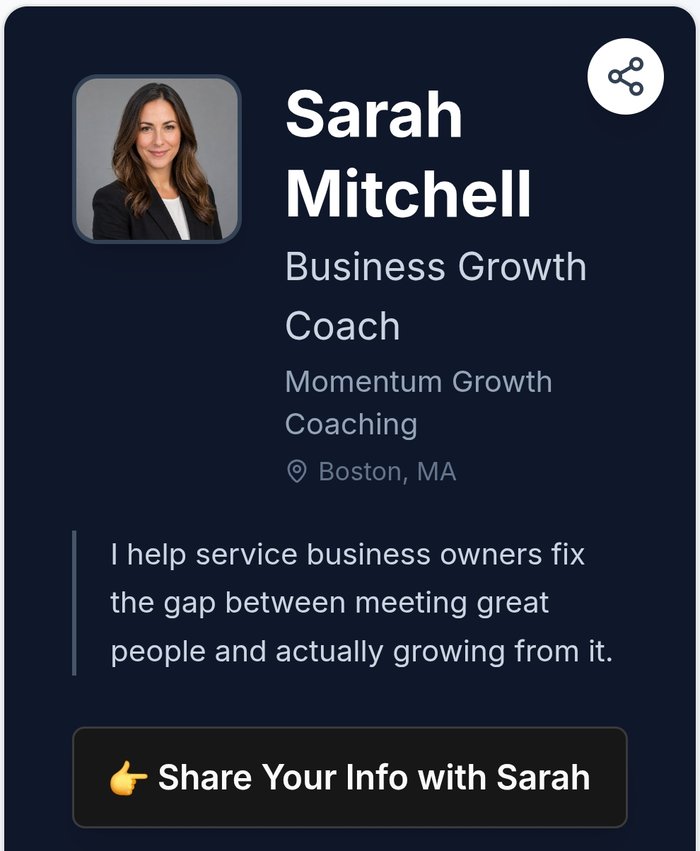
A digital business card gives consultants a simple way to make that next step obvious. Instead of handing over a static list of contact details, you can share one current profile with your expertise, proof of your work, booking link, and a way for the other person to share their information too.
Why Consultants Need More Than a Contact Card
A consultant is rarely selling a single product from a shelf. You are selling judgment, experience, and confidence that you can help with a specific business problem.
That makes context important. A name, phone number, and email address are useful, but they do not explain why someone should continue the conversation.
Your digital card should answer three questions quickly:
- What do you help people do?
- Why should they trust your approach?
- What is the easiest next step?
If a prospect has to search through your website to answer those questions, you have added friction to the introduction.
What to Put on a Consultant's Digital Business Card
Start with a short positioning statement. "Business consultant" is accurate but broad. A stronger description explains the audience and outcome, such as helping professional service firms improve their sales process or helping growing teams build repeatable operations.
Then include the essentials:
Your name and specialty. Make your role understandable without industry jargon.
A concise explanation of who you help. One or two sentences are enough. Focus on the problem and result rather than listing every credential.
Proof. Link to a case study, testimonial, portfolio, or relevant project. A prospect does not need a full biography during the first scan, but they may want evidence that you have solved similar problems.
A clear call to action. Let people book a short introduction, send an email, or request a resource. Give one primary action more visual weight than the rest.
A lead capture option. If the other person is interested, make it easy for them to share their name, email, and context. This is especially helpful when you are meeting several people at an event.
Use One Link for the Whole Conversation
Consultants often share several destinations during an introduction. There is a website, LinkedIn profile, calendar, newsletter, lead magnet, case study, and maybe a separate services page.
Sending six links in a text message can feel like assigning homework. A digital business card gives you one reliable URL that organizes those destinations in a logical order.
Keep the first screen focused. Put your main value proposition near the top, followed by your primary action. Secondary links can support the decision without competing with it.
You can update the profile as your practice changes. Add a new service, replace an outdated case study, or change your calendar without reprinting a card or sending a correction to everyone you have met.
Turn an Introduction Into a Lead
Sharing your information is only half of a useful exchange. In many consulting conversations, the valuable details belong to the other person.
What challenge are they facing? Are they looking for help now, or planning for later? Who else needs to be involved? A short form can capture that context while the conversation is fresh.
The form should be light. Ask for the information you will actually use, such as name, email, company, and the reason they want to connect. Too many questions turn a quick introduction into an application.
You can also invite the prospect to choose a next step. They might want a short call, a relevant guide, or a follow-up email. That choice helps you respond in a way that feels personal instead of automatic.
Where to Share It
A consultant's digital business card can work in more places than a printed card:
- Networking events and professional conferences
- Workshops, panels, and speaking engagements
- Referral introductions and client meetings
- Email signatures and proposal documents
- LinkedIn messages and social profiles
At a live event, show the QR code on your phone or on a presentation slide. In a referral email, share the profile link so the introduction has somewhere useful to go. After a meeting, include the same link in your follow-up so the prospect can find the resources you discussed.
The goal is consistency. If every channel points to the same current profile, people are less likely to encounter outdated information.
Follow Up While the Conversation Is Fresh
A digital card does not replace follow-up. It makes follow-up easier by giving you better context and a cleaner record of the exchange.
After meeting someone, write down the detail that matters. Maybe they are preparing for a reorganization, hiring their first sales leader, or trying to turn referrals into a repeatable channel. Use that detail in your follow-up message.
A simple structure works well:
- Remind them where you met.
- Mention something specific from the conversation.
- Share one useful resource or suggested next step.
- Offer a clear way to continue.
For more ideas, see How to follow up after a networking event. If you meet a large number of people at once, How to capture leads at networking events covers the contact collection side of the process.
Common Mistakes Consultants Make
The first mistake is treating the digital card like a mini resume. Prospects do not need every certification and past role before they understand the outcome you can help create.
The second is using a vague call to action. "Learn more" does not tell someone what happens after the click. "Book a 20-minute fit call" or "Send me your operations question" is more specific.
The third is creating a profile that looks good but does not capture any useful information. If you want a future conversation, give the prospect a simple way to share their details and explain what you will do next.
Finally, avoid changing your positioning every week. Your profile should be flexible, but it still needs to be recognizable when someone returns to it after a referral.
The Bottom Line
Digital business cards are useful for consultants because consulting opportunities depend on trust and continued conversation. Your card should do more than display your contact information. It should explain your focus, support your credibility, organize your best links, and make the next action easy.
The strongest setup is simple: write a clear positioning statement, add one or two proof points, include a focused call to action, capture the prospect's context, and follow up promptly.
Your introduction may last five minutes. Your digital card should help the right part of that conversation continue.
What should you do?
- Best for
- Independent consultants and fractional executives Coaches, advisors, strategists, and professional service providers Consultants who sell through conversations and referrals Small consulting teams that need consistent contact sharing
- Use this when
- You meet prospects through referrals, networking events, workshops, or sales conversations You want one current link for your services, case studies, calendar, and contact details You need to capture lead information instead of hoping prospects reach out later You are tired of outdated paper cards and scattered follow-up notes
- Avoid if
- Sending prospects to a generic homepage with no clear next step Listing every service instead of explaining the problem you solve Sharing a card without giving the prospect a reason to respond Collecting contact details without a follow-up process
- Alternatives
- [How to create a digital business card](/how-to-create-a-digital-business-card) - set up the foundation [How to capture leads at networking events](/how-to-capture-leads-at-networking-events) - turn introductions into usable contacts [How to follow up after a networking event](/how-to-follow-up-after-a-networking-event) - keep the conversation moving
Stop letting connections go cold
My MASH Card captures who you meet, remembers the context, and helps you follow up before the opportunity disappears.