
 lead-capture
What Makes a Digital Business Card Actually Convert Leads?
A digital business card converts leads when it combines a clear value proposition, one focused call to action, fast mobile performance, useful trust signals, and a low-friction way to share contact details. The best cards capture a little context about why someone connected, then connect that information to a consistent follow-up process.
What Makes a Digital Business Card Actually Convert Leads?
A digital business card does not convert leads just because it is digital. A profile link, QR code, or polished landing page only creates an opportunity. The conversion happens when the person who receives your information understands what to do next and has a good reason to do it.
That is the difference between a digital card that gets viewed and one that creates conversations. The best cards are not just online replacements for paper cards. They are simple lead capture paths built around trust, clarity, and a useful next step.
What makes a digital business card convert leads?
A digital business card converts leads when it combines a clear value proposition, one focused call to action, fast mobile performance, useful contact information, and a low-friction way for someone to share their details. The card should answer three questions quickly: who are you, how can you help, and what should I do next?
A beautiful design helps, but it is not the main factor. If visitors cannot tell what you do or are asked to complete a long form before they understand the value, the card will lose potential leads.
Start with the conversation, not the template
The strongest digital business cards are built around the situation in which they will be shared. A real estate agent may want a visitor to request a property list. A contractor may want a homeowner to book an estimate. A consultant may want a prospect to schedule a discovery call.
Those are different goals, so they should not all lead to the same generic profile.
Before choosing colors or adding every social link, decide what you want to happen after the card is opened. If your answer is “I want them to contact me,” make that action specific. Do you want a call, a quote request, a calendar booking, a referral, or a message about a particular service?
A focused goal makes every other decision easier. For more background on the format itself, what is a digital business card explains how the basic model works.
Make the value obvious above the fold
People should not have to scroll through your entire profile to understand why they should continue. The first screen should include your name, role, company, and a short statement about the result you help create.
“Marketing consultant” is accurate, but it is not especially useful. “I help local service businesses turn more website visits into booked appointments” gives a visitor a clearer reason to keep reading.
Your value statement does not need to be clever. It needs to be specific. Mention the customer, the problem, or the outcome you understand best. Clear language builds more confidence than broad claims about being passionate, innovative, or customer focused.
Give people one obvious next step
A card with eight competing buttons creates work for the visitor. Should they call, email, visit your website, follow you on LinkedIn, watch a video, download a guide, or fill out a form?
Some people may do one of those things, but many will do none. A converting card gives the primary action visual priority and keeps secondary options available without allowing them to compete.
Good primary calls to action include:
- Request a quote
- Book a conversation
- Get the event follow-up guide
- Send me the project details
- Join the referral network
The right wording depends on the audience and the moment. At a networking event, “Let’s continue the conversation” may feel natural. After a sales meeting, “Schedule your next step” may be more appropriate.
The button should also lead exactly where it promises. If it says “Book a call,” it should open a scheduling page. Do not send someone to a homepage and expect them to find the booking link themselves.
Capture context, not just an email address
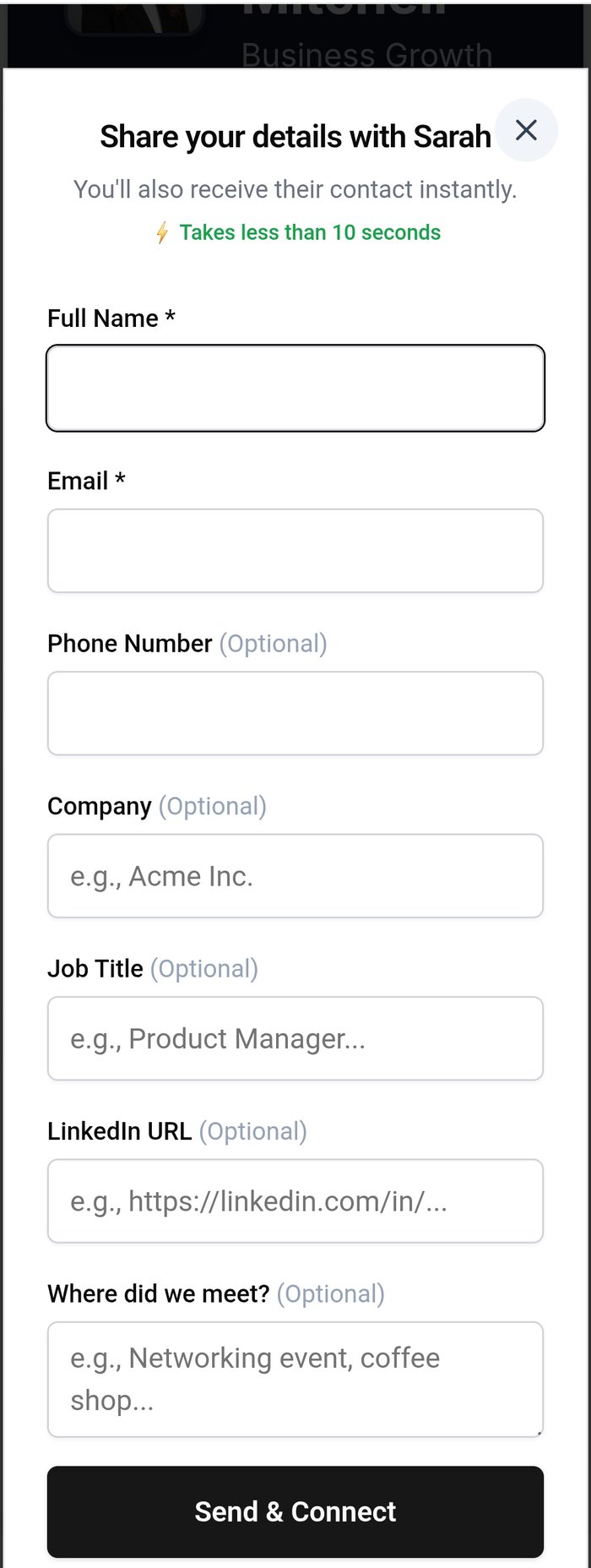
A name and email address are useful, but they do not explain why someone connected with you. A short context question can make the next conversation much more relevant.
For example, a form could ask:
- What would you like to discuss?
- Which service are you interested in?
- Where did we meet?
- What are you trying to improve right now?
Keep the question easy to answer. A sentence or a dropdown is usually better than a large questionnaire. The goal is to help you remember the interaction and respond intelligently, not make the visitor complete an intake process before they trust you.
I learned this lesson while working trade show booths for HapYak, a SaaS video platform. Electronic scanners gave us names and email addresses, but they did not preserve the details of the conversations. After the event, we had a list of contacts and very little idea what any individual person cared about.
A better digital card closes that gap. It gives someone a useful profile while creating a lightweight way to tell you what matters to them.
Build trust before asking for the lead
People are more likely to share their information when the card gives them something useful first. That might be a helpful resource, a clear explanation of your service, examples of your work, or an easy way to save your contact details.
Trust signals can be simple:
- A professional photo that looks like you today
- A concise description of what you do
- Client types or industries you serve
- Relevant testimonials or proof points
- Links to work samples or professional profiles
- A privacy note explaining how submitted information is used
Do not fill the card with every credential you have. Choose the proof that supports the action you want the visitor to take. A person deciding whether to request a quote needs different information from someone deciding whether to refer you.
Make the experience fast on a phone
Most people will open a digital business card on a mobile device, often while standing in a hallway, lobby, event floor, or parking lot. Slow loading, tiny buttons, broken links, and excessive scrolling create immediate friction.
Test the card on your own phone before sharing it widely. Open it from a QR code, not just from an editor preview. Tap every button. Submit the form. Check whether the contact-saving option works. Look at the page in both strong and weak cellular conditions.
The simplest test is this: hand your phone to someone who has never seen the card and ask them what they think they should do. If they hesitate, the page needs clearer direction.
Use QR codes and links where they fit naturally
A QR code is useful when the other person can scan it easily. Put it on presentation slides, signage, printed leave-behinds, invoices, event badges, and email signatures when appropriate. A direct link is better for text messages, email, social profiles, and online conversations.
MASH Card focuses on QR code and link sharing, so you do not need special NFC hardware to make the experience work. The important thing is not adding technology for its own sake. It is making your information easy to open in the moment.
If you want a practical setup walkthrough, how to create a digital business card covers the essential pieces.
Connect the card to your follow-up system
Lead capture only matters if someone does something with the lead afterward. Decide where submissions go and who owns the next step. That could be your CRM, an email inbox, a spreadsheet, or a simple follow-up routine while your process is still small.
Create a response standard for yourself. For example, review new submissions at the end of each workday, add one personal detail to the reply, and set a reminder for the next action. A card cannot compensate for a follow-up process that does not exist.
You can also use source information to compare results. A card shared at a conference may perform differently from one in your email signature. Tracking the source helps you learn which situations produce real conversations instead of just page views.
How to build a follow-up system that actually works can help turn these submissions into a repeatable process.
What competitors get right, and where to look closely
Platforms such as Linq, HiHello, Popl, and Blinq all show that digital business cards can go beyond a static profile. Depending on the product and plan, they may offer contact exchange, lead capture, analytics, CRM connections, or team management.
When comparing tools, do not judge only by the number of integrations or the appearance of the template gallery. Ask whether the platform supports the specific conversion path you need. Can a visitor understand your offer? Can they submit useful context? Will you actually see and act on the lead?
The best option is the one your audience can use quickly and your team can maintain consistently. More features do not automatically mean more conversions.
Common mistakes that stop conversion
A few choices repeatedly weaken otherwise good digital cards:
Making the card a resume. A long list of titles and achievements may be accurate, but it can hide the reason someone should contact you.
Using vague calls to action. “Learn more” tells people very little. Say what they will get or what will happen next.
Collecting too much information. Every required field adds friction. Ask only for what you need at this stage.
Sending everyone to the same page. A referral partner, event lead, and existing customer may need different next steps.
Ignoring the follow-up. A completed form is the beginning of the process, not the result.
The bottom line
A digital business card converts leads when it makes the next step clear, useful, and easy. The winning formula is not a flashy profile. It is a focused message, a trustworthy experience, a short path to action, and a follow-up process that keeps the conversation moving.
Use the card to answer the visitor's immediate question: “Why should I connect with this person?” Then give them one simple way to continue.
The technology can open the door. Your clarity and follow-through are what turn the visit into a lead.
What should you do?
- Best for
- Consultants, sales professionals, contractors, real estate agents, and service businesses Anyone who wants a digital business card to create conversations instead of only sharing contact details Teams that need lightweight lead capture connected to a follow-up routine
- Use this when
- You want a digital business card to generate inquiries, bookings, referrals, or quote requests You are receiving profile views but not enough meaningful follow-up You need to improve lead capture at networking events or meetings You are comparing digital business card tools for a sales or service team
- Avoid if
- Using a generic profile with no clear next step Adding too many competing buttons or required form fields Sending every visitor to the same landing page Treating page views as conversions Using NFC hardware when a QR code or link is sufficient
- Alternatives
- [How to capture leads at networking events](/how-to-capture-leads-at-networking-events) for event-specific lead capture [How to build a follow-up system that actually works](/how-to-build-a-follow-up-system) for turning submissions into a process [How to track digital business card leads and follow up](/how-to-track-digital-business-card-leads) for organizing and responding to contacts
Stop letting connections go cold
My MASH Card captures who you meet, remembers the context, and helps you follow up before the opportunity disappears.


