
 industry
Digital Business Cards for Wedding and Event Vendors
Digital business cards help wedding and event vendors turn brief conversations into organized follow-up opportunities. Instead of handing out a paper card that can disappear, vendors can share a mobile page with their services, portfolio, contact options, and a simple way to continue the conversation.
Digital Business Cards for Wedding and Event Vendors
Wedding and event vendors rarely get a perfect sales environment. You might have three minutes with a couple at an expo, a quick introduction to a venue manager, or a conversation with a planner while everyone is moving between meetings. In that moment, your business card has one job: make it easy for the other person to remember you and take the next step.
A digital business card gives wedding and event vendors a faster way to share services, portfolio links, contact details, and follow-up options from one mobile page. Instead of hoping a paper card survives a crowded venue, you can share a link or QR code, capture useful context, and continue the relationship while the conversation is still fresh.
Why do wedding and event vendors need more than a paper card?
Paper cards are familiar, but they are not very helpful on their own. A couple may meet a photographer, florist, DJ, caterer, venue, coordinator, and rental company in the same afternoon. By the time they get home, several cards may be mixed together in a bag with brochures and receipts.
The problem is not that your card looked bad. The problem is that it did not help the person remember what made your service relevant to their event.
A digital business card can put the important information in one place:
- Your name, company, phone number, and email
- A short description of the events you serve
- Portfolio, gallery, video, or social links
- Service areas and availability details
- A direct way to request a consultation
- A simple follow-up path after the first conversation
This is especially useful when your business depends on trust and visual proof. Couples want to see your work. Planners want to know whether you are dependable. Venues want partners who communicate clearly. Your card should help answer those questions instead of making people search for you later.
What should a wedding vendor put on a digital business card?
Start with the information someone needs immediately after meeting you. Your business name and contact information matter, but they are only the foundation. The page should make your positioning obvious within a few seconds.
For example, a photographer could say, “Wedding and elopement photography for couples who want relaxed, documentary-style images across New England.” A DJ could explain the type of celebrations they specialize in and link directly to sample sets or reviews. A planner could highlight the size and style of events they coordinate.
Your page should usually include:
- A clear service description that says who you help
- One or two strong portfolio links instead of every possible link
- A call to action such as “Request availability” or “Book a consultation”
- A way to contact you without making someone copy information manually
- A short note about your service area, event type, or ideal client
Keep the first screen focused. You can link to a full website for packages, galleries, testimonials, and FAQs. The digital business card is the helpful front door, not a replacement for every page of your site.
How can vendors capture the context behind a new connection?
A name and phone number are not enough if you meet dozens of people in one weekend. The useful detail is the context: where you met, what they were planning, what they asked about, and what you promised to send.
At a trade show for HapYak, a SaaS video platform, I saw how electronic scanners could collect leads without preserving the reason the conversation mattered. The scan looked efficient, but later it was difficult to remember who wanted what. That is the same issue wedding and event vendors face at expos and networking events. A contact named “Jamie” is not very useful if you cannot remember whether Jamie was planning a fall wedding, managing a venue, or looking for a second photographer.
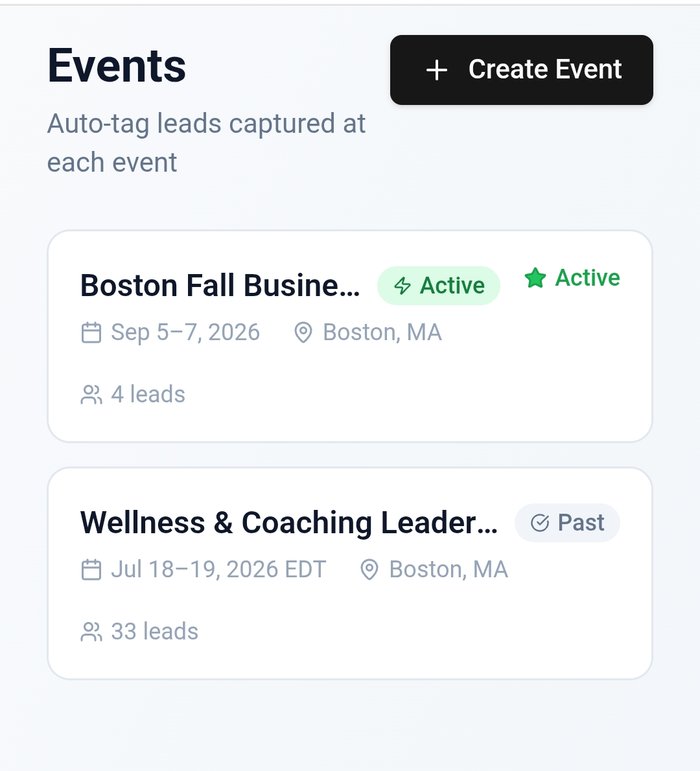
When you share your digital business card, capture a quick note while the interaction is fresh. A useful note might say, “Met at the downtown venue open house. Planning a September wedding for 120 guests. Asked about photo and video packages. Send gallery link Tuesday.”
That small detail changes the follow-up from a generic sales message into a continuation of the conversation.
How should wedding and event vendors follow up?
The best follow-up is specific, timely, and easy to answer. You do not need a long pitch. You need to remind the person who you are, reference the conversation, and offer the next useful step.
A simple follow-up structure looks like this:
- Thank them for the conversation
- Mention the event or detail you discussed
- Share one relevant link or resource
- Suggest one clear next step
For a couple, that might be a gallery from a similar venue. For a planner, it might be your service guide and availability. For a venue manager, it could be a concise partner introduction with your insurance information or preferred contact process.
You can also create a few reusable templates, then personalize the opening line with your notes. MASH Card is useful here because the goal is not just to share contact information. It is to help you keep the handoff organized so the next message does not depend on memory.
For more detail, see how to follow up after a networking event and how to build a follow-up system that actually works.
Can a digital business card help vendors at wedding expos?
Yes, especially when the event is crowded and conversations are short. Put your digital card link on a table sign, booth display, printed brochure, email signature, and social profile. You can also use a QR code so someone can scan it without typing your name into a search bar.
The QR code should lead to a focused page, not a confusing collection of unrelated links. If you are exhibiting as a florist, the first actions should relate to floral design, consultations, galleries, and availability. If you serve multiple event types, make the categories easy to understand.
A good expo flow is simple:
- Have a short conversation and learn what the person is planning.
- Share your digital card by QR code or link.
- Add a note about the person and the next step.
- Follow up with the specific resource you discussed.
This process works for photographers, videographers, florists, DJs, caterers, invitation designers, rental companies, venues, planners, officiants, and other event professionals.
How does this compare with other digital card tools?
Tools such as Linq, HiHello, Popl, and Blinq can help professionals share contact information digitally. The right choice depends on how much you need beyond a profile link.
For wedding and event vendors, the important comparison points are not only design and sharing methods. Look at whether the tool supports your follow-up process, helps preserve context, makes your portfolio easy to reach, and fits the way you meet people in real life.
A visually polished card is useful, but it should also help answer practical questions: Can I share it quickly? Can a new connection understand my services? Can I make the next step obvious? Can I remember why this person mattered after a busy weekend?
You can read what makes a digital business card actually convert leads for a broader look at the difference between sharing information and creating a useful next step.
What should vendors avoid?
Avoid putting every service, social account, review, and gallery on the first screen. Too many choices create friction. Pick the links that support the conversation you are most likely to have.
Avoid generic follow-up messages that make the recipient wonder whether you remember meeting them. A message that says “Just checking in” is easy to ignore. A message that says “You mentioned your September reception at the Harborview venue, so I’m sending the gallery from a similar celebration” gives the person a reason to respond.
Also avoid treating the digital card as a replacement for a relationship. Technology can make sharing and organizing easier, but your judgment, responsiveness, and actual work are what earn the booking.
Is a digital business card worth it for event professionals?
For most wedding and event vendors who regularly network, exhibit, visit venues, or meet prospective clients, a digital business card is worth considering because it makes the first handoff easier to remember and act on. It gives people a direct path to your work and gives you a better chance of following up with useful context.
The biggest benefit is not simply reducing paper. It is creating a repeatable process for moving from conversation to connection, from connection to follow-up, and from follow-up to a real consultation.
Your next event will still be busy. People will still move quickly, conversations will still overlap, and nobody will remember every detail automatically. Give yourself a system that helps you capture the useful part while it is happening, then use that context to make your follow-up feel personal.
That is what makes a digital business card valuable for wedding and event vendors. It is not just a modern way to hand someone your information. It is a practical bridge between meeting someone and giving them a reason to keep the conversation going.
What should you do?
- Best for
- Best for wedding and event vendors who network at expos, venue visits, open houses, conferences, styled shoots, and live events where conversations are short and follow-up matters.
- Use this when
- Use a digital business card when you meet couples, planners, venues, coordinators, photographers, caterers, or other event professionals and want an easy way to continue the conversation.
- Avoid if
- Avoid sending people to a cluttered homepage, collecting contacts without context, or relying on memory to reconstruct every conversation after a busy event.
- Alternatives
- A printed card, brochure, QR code on signage, or a full website can still play a role. The strongest setup often combines a digital card for quick sharing with a website or portfolio for deeper research.
Stop letting connections go cold
My MASH Card captures who you meet, remembers the context, and helps you follow up before the opportunity disappears.


